The Digital Asset Manager Made for Photos.
ShotLocker is a DAM without the enterprise setup: one library for every photo, searchable by its own metadata, ready to deliver the moment it lands.
Try any paid plan free for 14 days, or start free with 4 GB.
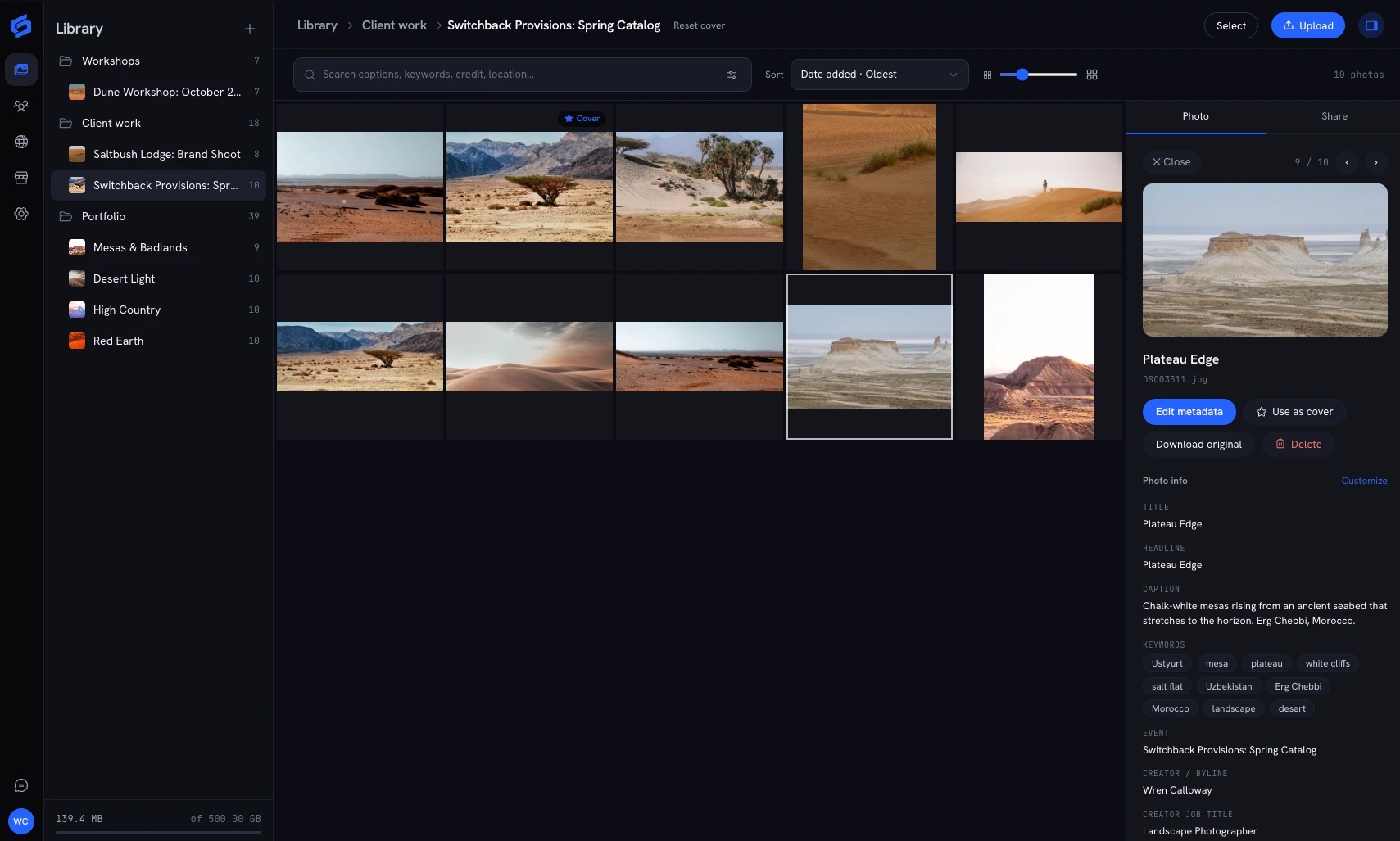
An Asset Manager That Reads Your Photos.
- Metadata Read Automatically
- IPTC and EXIF are read from every photo on upload: captions, keywords, camera and capture date. Nothing to retype.
- Search by What Is in the File
- Find photos by keyword and caption on every plan, and by camera and date on paid plans.
- Folders and Galleries
- Folders hold galleries and galleries hold photos. Drag to reorganize, and sort the way you work.
- Edit Captions and Keywords
- Fix a caption or add keywords in the library. The original file is left exactly as you uploaded it.
- Fast Ingest
- Parallel, resumable uploads move a shoot in up to 7x faster than the leading competitor, and duplicates are skipped.
- Bring an Existing Library
- Import a library from one zip on paid plans. Folders that hold photos become galleries.
From Asset to Delivered in One Place.
A digital asset manager earns its keep when a photo leaves it. Delivery is built into the same library.
- Controlled Sharing
- Open a gallery to anyone with the link, to signed-in clients, or behind a password with an expiry date on paid plans.
- Download Sizes and Logs
- Choose which sizes each gallery offers, allow a ZIP of everything, and see who downloaded what.
- Watermarks
- On paid plans, draw a text or logo watermark on photos shown on screen. Downloads you allow stay clean.
- Team Accounts
- For teams and organizations, a team account can add SFTP upload, person and sponsor detection and AI search. Price one with the team pricing calculator.
Questions
What Is a Digital Asset Manager?
A digital asset manager (DAM) is software that stores media files in one place, organizes them, makes them searchable and controls how they are shared. ShotLocker is a DAM built for photographs.
How Is This Different From Cloud Storage?
Cloud drives find files by name. ShotLocker reads the metadata inside each photo, so you search by keyword, caption, camera and date, and you deliver galleries to clients from the same library.
Do I Have to Tag Everything by Hand?
No. Captions and keywords already embedded in your photos are read on upload and are searchable right away. You can edit or add them in the library.
Is There a DAM for a Whole Team?
Yes. Team accounts are set up per organization with their own storage and features. The team pricing calculator shows the monthly and yearly price line by line.
What Does It Cost?
The free plan includes 4 GB with no card needed. Paid plans are 100 GB, 500 GB and 1 TB, from $15.99 a month billed yearly, and every one starts with a 14-day free trial.
Can I Move From Another Asset Manager?
Yes. Export your library as a zip, drop it into ShotLocker on a paid plan, and check the folders and galleries it will create before anything is imported.
More of What ShotLocker Does
- Photo StorageKeep every shoot in one library at full resolution. Uploads are fast, every photo is searchable, and your originals are always yours to download.
- Client GalleriesShare a gallery in a click. Clients sign in with an email link, mark their favorites and download what you allow, and you see what they did.
- Sell Photos OnlineTurn on selling for a gallery and it becomes a store: buyers pick photos, pay by card and get their files, and the money goes to your Stripe account.
Also see how uploads stay fast, switching from another photo host and pricing.